
AVA AI
AVA AI - AI Dashboard and AI Accuracy
This release introduces a major enhancement to the AVA AI module, focusing on a redesigned and more insightful dashboard along with a structured AI Accuracy management system.
Previously, the dashboard provided limited insights. With this update, AVA AI now delivers comprehensive analytics, improved visibility into AI usage, and better performance tracking. Users can now monitor how the AI is being used across the organization, evaluate performance trends, and manage accuracy benchmarks more effectively.
This upgrade strengthens decision-making by providing data-driven insights into AI interactions, response efficiency, and system performance.
AI Dashboard
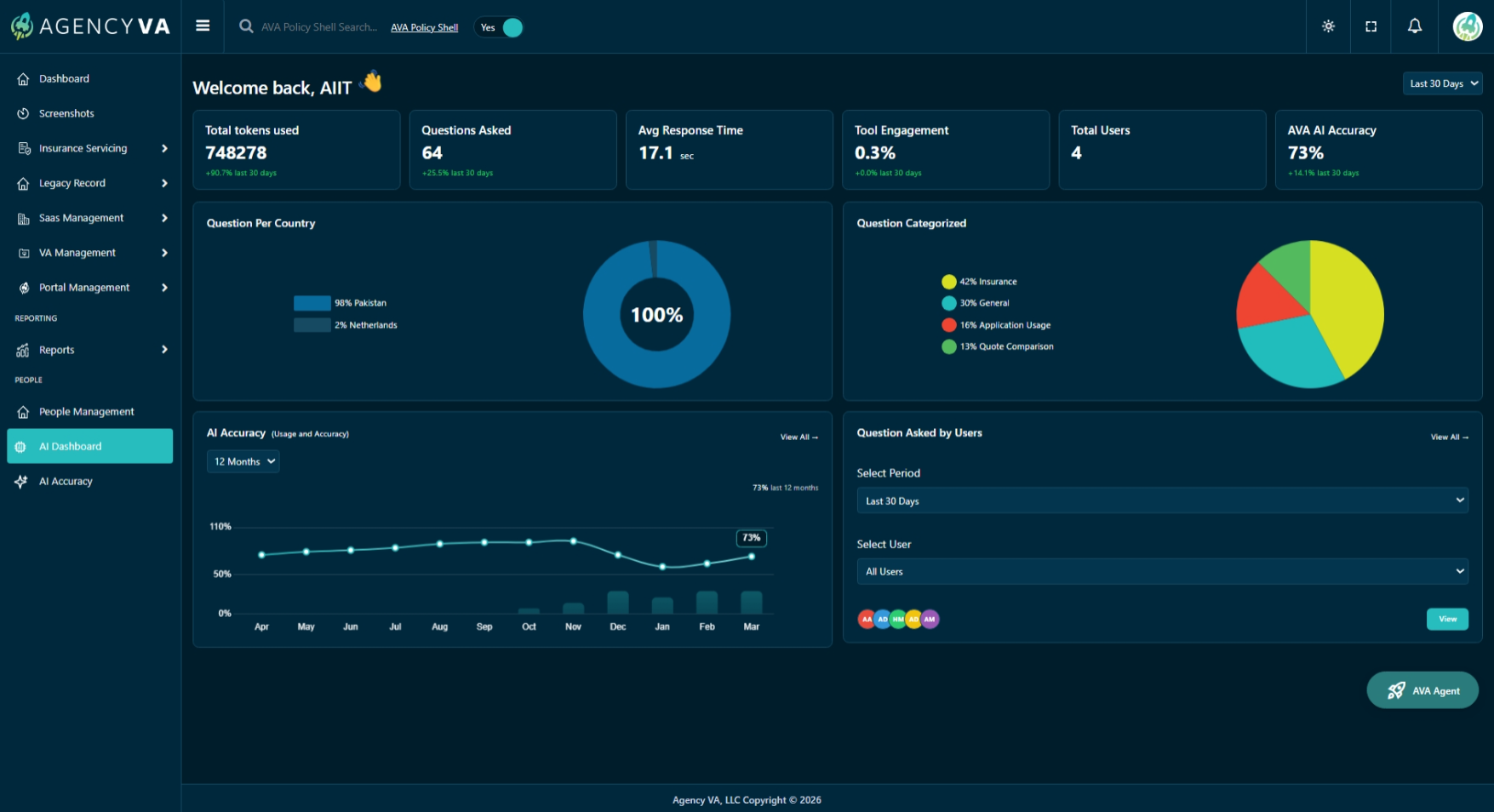
The AI Dashboard has been completely redesigned to provide a centralized and detailed overview of AI usage, performance, and engagement across the system. It allows organizations to understand how users are interacting with AVA AI and how effectively the system is responding.
Key Metrics Overview
At the top of the dashboard, users can view key performance indicators that provide a quick summary of AI activity:
- Total Tokens Used: The total number of tokens consumed across all AI interactions.
- Questions Asked: The total number of queries submitted by users.
- Avg Response Time: The average time taken by the AI model to respond to user queries, helping evaluate system responsiveness.
- Tool Engagement: A percentage indicating how actively the AI system is being used.
- Total Users: The number of users interacting with AVA AI.
- AI Accuracy: Displays the current accuracy percentage configured in the system.
- Quote Comparison Token Tracing: Tracks and displays the number of tokens used specifically during quote comparison operations. This helps monitor resource consumption for pricing or comparison workflows and provides deeper visibility into how AI handles complex quote evaluations.
These metrics help stakeholders quickly assess usage trends, performance efficiency, and engagement levels.
Geographical & Category Insights
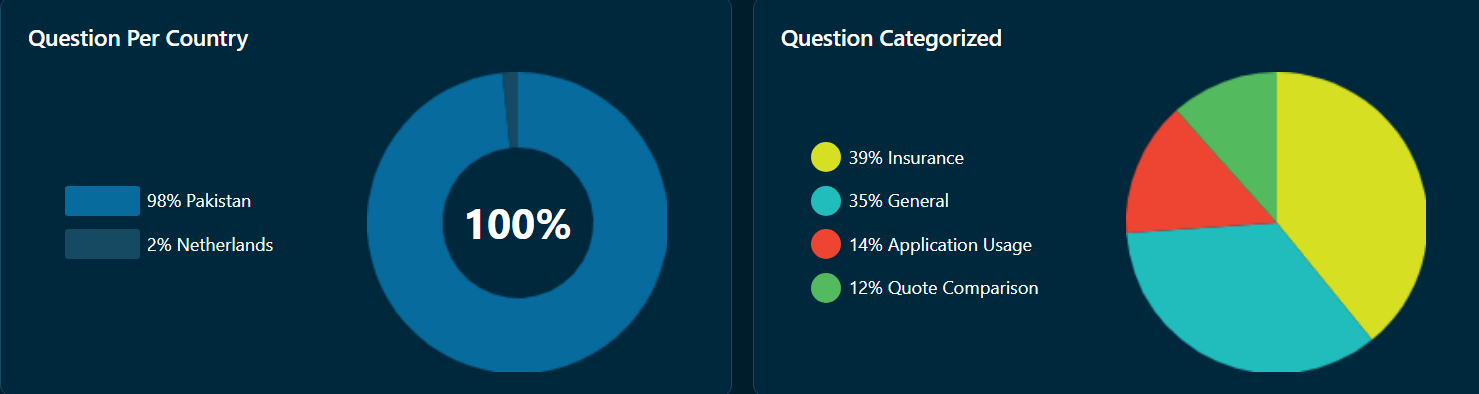
The dashboard provides visual insights into how AI is being used across different regions and categories.
- Question Per Country:
Displays the distribution of questions based on IP-based country detection. Since AVA Vision does not store user country data, this is calculated using request IP addresses.
- Question Categorized:
Shows the percentage breakdown of questions across different categories such as:
- Insurance
- General
- Application Usage
- Quote Comparison
These insights help identify usage patterns and key areas of AI interaction.
AI Accuracy Trends
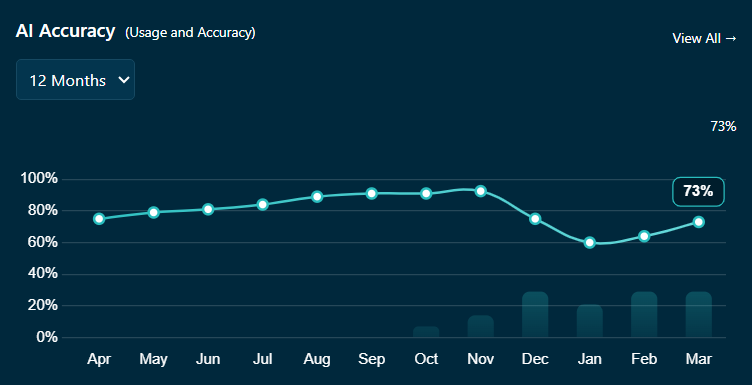
The dashboard includes a visual trend of AI performance over time.
- Users can view accuracy trends across different time ranges (e.g., months)
- Helps track improvements or fluctuations in AI performance
- Supports better decision-making for optimization
User Interaction & Filtering
The dashboard also provides insights into how users interact with AVA AI.
- View questions asked by users based on selected filters
- Filter data using:
- Time Period: 24 Hours, 7 Days, 30 Days
- User Selection
- Helps analyze user engagement and AI usage patterns
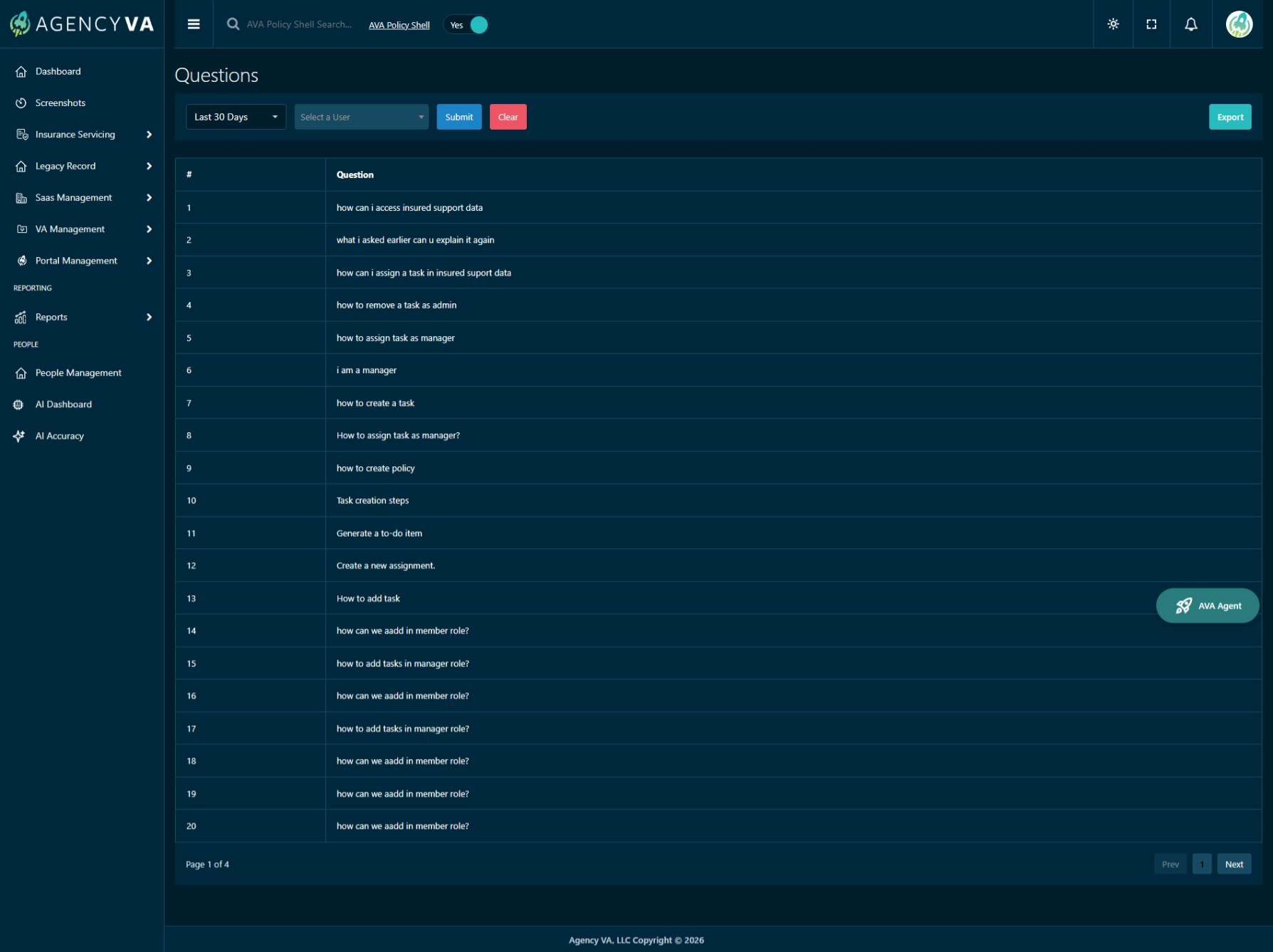
Clicking on “View All” redirects to a detailed page showing all user queries.
Questions Page Features
- Displays a complete list of user questions
- Includes filters for:
- Time period
- User selection
- Export functionality for reporting
- Enables deeper analysis of how users are interacting with the AI system
AI Accuracy Module
The AI Accuracy module has been introduced to allow organizations to define, manage, and track AI accuracy values in a structured way.
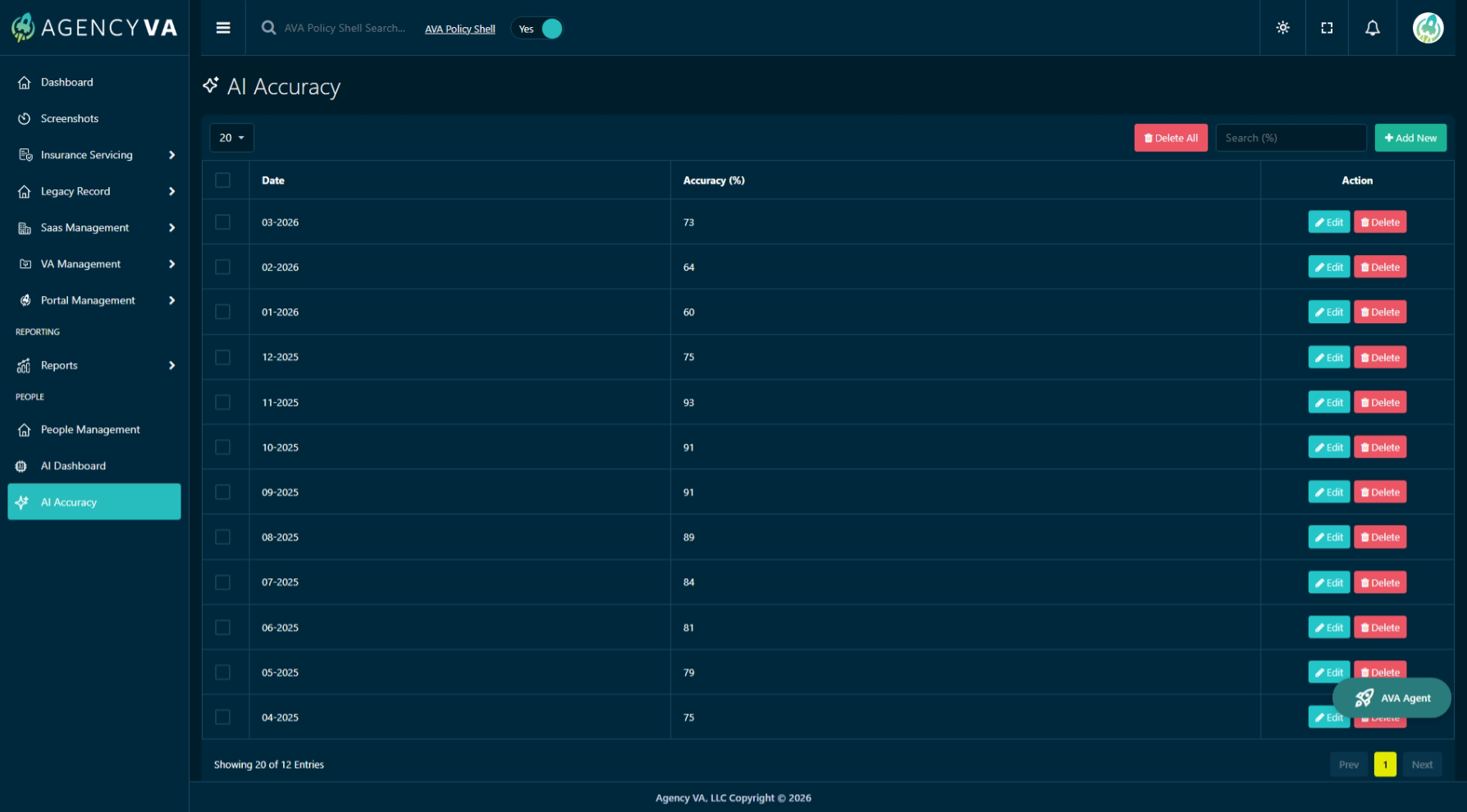
How AI Accuracy Works
AI Accuracy in AVA is based on a manual evaluation process:
- The AVA team evaluates the AI by asking a set of questions (e.g., 100 questions)
- Based on the quality of responses, an accuracy percentage is calculated
- This value is then entered and maintained within the system
This approach ensures that accuracy reflects real-world performance and evaluation standards.
AI Accuracy Management Features
The module provides full control over accuracy records:
- View accuracy records by date
- Track historical accuracy trends
- Search accuracy data
- Delete existing records
- Maintain structured accuracy history
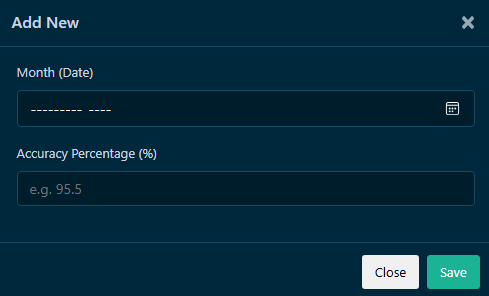
Add New Accuracy
Users can add new accuracy records through a simple input form.
Fields Include:
- Month (Date)
- Accuracy Percentage (%)
This allows organizations to continuously update and maintain AI performance benchmarks over time.
Key Improvements in This Release
- Redesigned AI Dashboard with advanced analytics
- Added comprehensive usage and engagement tracking
- Introduced IP-based geographical insights
- Implemented AI Accuracy trend visualization
- Added Questions tracking and reporting page
- Introduced AI Accuracy management module
- Enabled manual accuracy benchmarking system
Summary
This release significantly enhances AVA AI by transforming it into a data-driven and insight-rich platform. With improved analytics, better tracking, and structured accuracy management, organizations can now monitor AI performance, understand user behavior, and continuously improve AI effectiveness.
AVA AI – Release Notes
This release introduces two powerful AI-driven features designed to enhance decision-making, document understanding, and user interaction within AVA AI.
1. Quote Comparison (AI-Powered Analysis)
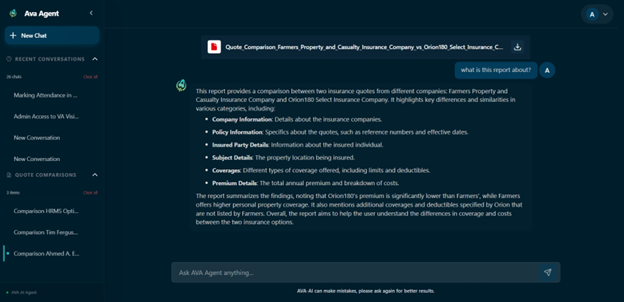
AVA AI now supports intelligent Quote Comparison, allowing users to upload and analyze multiple quotes with ease.
How It Works
- Users can upload two quotes directly into the system.
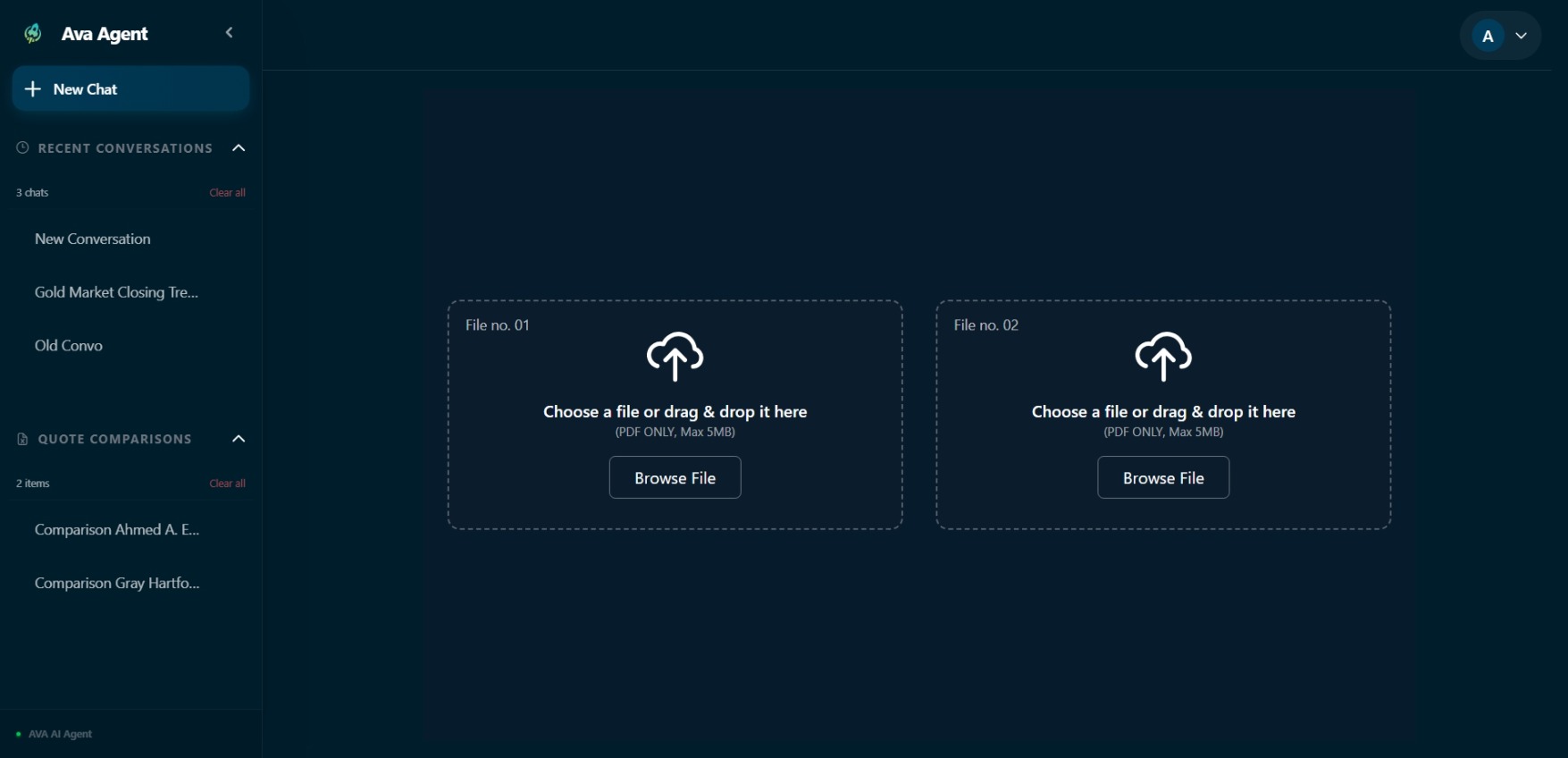
- AVA AI processes and analyzes both quotes to identify differences, similarities, and key details.
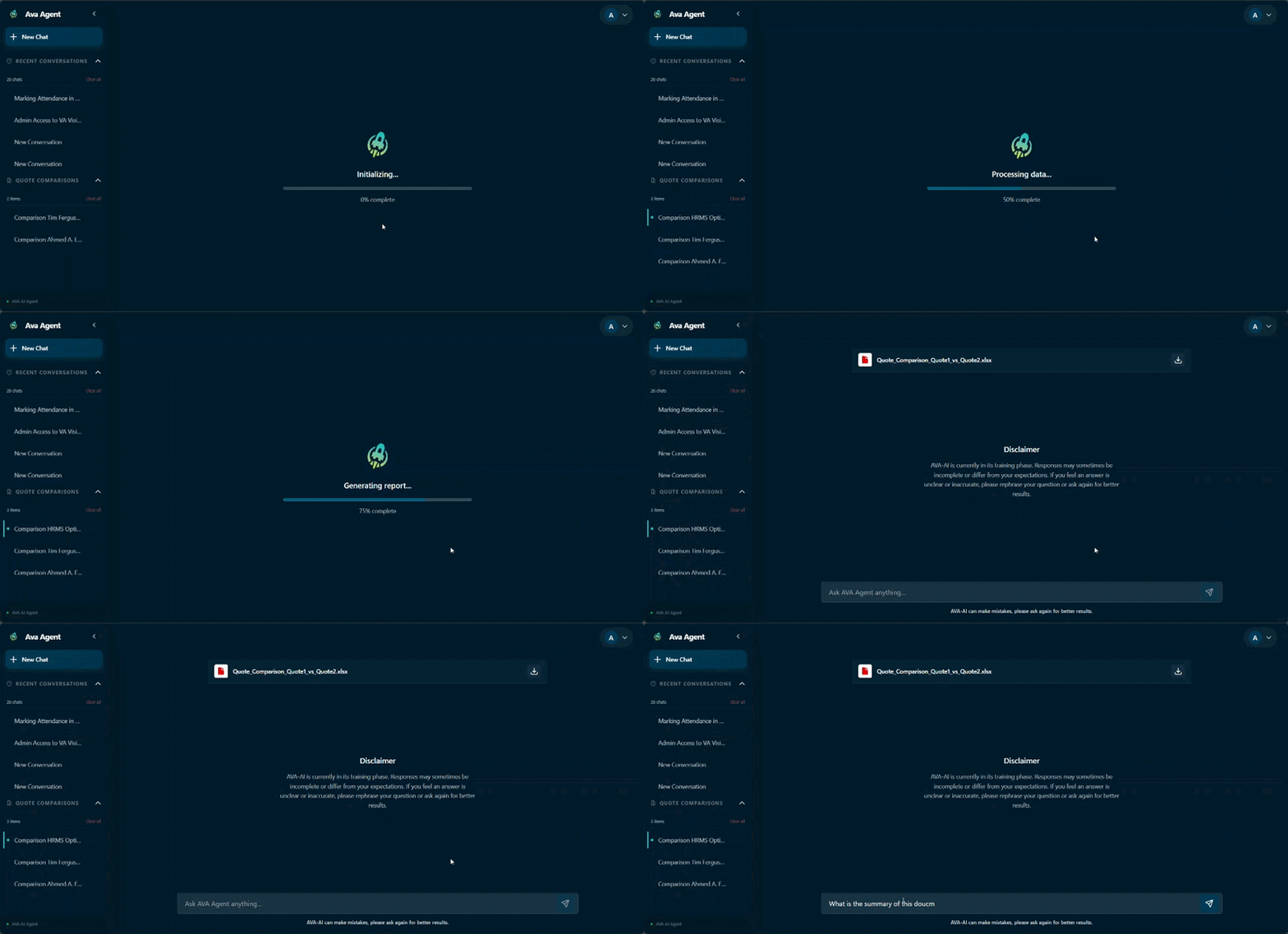
- The system generates a structured comparison report in Excel format for easy review and sharing.
Key Capabilities
- Automated comparison of uploaded quotes
- Clear, structured output delivered as an Excel file
- Eliminates manual analysis and reduces comparison errors
Interactive AI Conversation
After the comparison file is generated, users can:
- Ask questions about the compared quotes
- Request clarifications or deeper insights
- Interact conversationally with AVA AI using the generated data
This allows users to move seamlessly from comparison to decision-making.
2. Admin Documentation Ingestion – Help & Knowledge Base
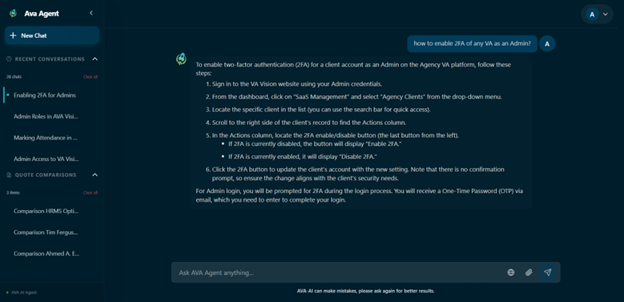
We have introduced Documentation Ingestion for the Admin role, enabling AVA AI to understand and respond based on uploaded help and reference documents.
Feature Overview
- Admins can upload Help Documents and internal documentation into AVA AI.
- The AI processes the content and uses it as a knowledge source for responses.
- Improves accuracy and consistency when answering documentation-related queries.
Key Benefits
- Centralized knowledge ingestion for AI responses
- Faster and more accurate help and guidance
- Strong foundation for scalable AI-driven documentation support
AVA AI: Productivity Suite Update
The AVA AI module has undergone a significant upgrade, introducing live data capabilities and a more flexible user interface designed to bolster real-time decision-making and agent support. This release focuses on transparency for administrators, live information retrieval for all users, and intuitive guidance for staff.
1. AVA AI Dashboard (Admin)
Administrators now have access to a powerful oversight tool to monitor platform adoption and performance. The new dashboard provides visibility into Token Usage over the last 24 hours and Employee Engagement percentages. To help managers understand usage trends, the system includes Usage Graphs, identifies the top five most active users, and lists the most recent queries submitted to the AI.

2. Web Search (Live Data)
The AI's capabilities have been expanded beyond its previous knowledge cutoff from late 2023. By selecting the new Web Search (World) icon, users can now access live internet data. This allows for the retrieval of real-time industry news and current insights, ensuring that the information provided is always up to date.

3. AVA Help for Agents
To reduce friction, a new helping system provides VAs with step-by-step guidance for navigating the platform and completing tasks, such as submitting reports. This system now includes the Member Help documentation.